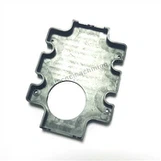
Hey there! As a supplier of CNC Milling For Parts, I've seen my fair share of issues pop up when it comes to making parts on CNC milling machines. In this blog, I'm gonna share some tips on how to troubleshoot these machines effectively.
1. Understanding the Basics
Before you start troubleshooting, it's crucial to have a solid understanding of the CNC milling machine and the CNC Milling Machining Process. This includes knowing how the machine moves, how the cutting tools work, and how the control system operates.
The CNC milling machine uses a computerized control system to move the cutting tool along multiple axes. The cutting tool removes material from the workpiece to create the desired shape. Any problem with the movement, the cutting tool, or the control system can lead to issues in the part production.
2. Common Issues and Solutions
Tool Wear and Breakage
One of the most common issues in CNC milling is tool wear and breakage. Over time, the cutting tool can wear down due to the friction and heat generated during the machining process. This can lead to poor surface finish, dimensional inaccuracies, and even tool breakage.
Solution: Regularly check the cutting tools for wear and replace them when necessary. You can also use tool monitoring systems to detect early signs of wear and adjust the machining parameters accordingly. Additionally, make sure to use the correct cutting tools for the material you're machining. Different materials require different types of cutting tools, so using the wrong tool can accelerate wear and breakage.
Dimensional Inaccuracies
Another common problem is dimensional inaccuracies in the parts. This can be caused by several factors, including incorrect programming, tool wear, machine vibrations, or thermal expansion.
Solution: First, double - check the CNC program to ensure that all the dimensions and machining parameters are correct. If the program is correct, then inspect the cutting tool for wear. If the tool is worn, replace it. To reduce machine vibrations, make sure the machine is properly leveled and the workpiece is securely clamped. Thermal expansion can be minimized by using coolant to keep the machine and the workpiece at a consistent temperature.
Surface Finish Problems
Poor surface finish can be a major issue, especially for parts that require a high level of precision and aesthetics. This can be caused by factors such as tool wear, improper cutting parameters, or chip accumulation.
Solution: If the problem is due to tool wear, replace the tool. Adjust the cutting parameters, such as the cutting speed, feed rate, and depth of cut, to achieve a better surface finish. You may need to experiment with different values to find the optimal settings for your specific material and machine. To prevent chip accumulation, use proper chip removal techniques, such as high - pressure coolant or chip conveyors.
Machine Vibrations
Excessive machine vibrations can cause a variety of problems, including poor surface finish, dimensional inaccuracies, and tool wear. Vibrations can be caused by imbalanced cutting tools, loose machine components, or improper workpiece clamping.
Solution: Check the cutting tools for balance. If a tool is imbalanced, it can cause vibrations during operation. You can use a tool balancing machine to correct the balance. Inspect the machine components for any loose parts and tighten them if necessary. Make sure the workpiece is clamped securely to prevent it from moving during machining, which can also cause vibrations.
3. Checking the Control System
The control system is the brain of the CNC milling machine, and any issues with it can lead to problems in part production.
Program Errors
Incorrect or corrupted CNC programs can cause the machine to operate incorrectly. This can result in dimensional inaccuracies, tool collisions, or even machine damage.
Solution: Always double - check the CNC program before running it on the machine. Use simulation software to verify the program and detect any potential errors. If an error is found, correct it in the programming software and re - simulate the program before running it on the machine.


Control Panel Issues
Problems with the control panel, such as loose connections, malfunctioning buttons, or display errors, can prevent the machine from operating correctly.
Solution: Inspect the control panel for any visible damage or loose connections. Check the buttons to make sure they are functioning properly. If there is a display error, try restarting the machine. If the problem persists, contact the machine manufacturer's technical support for further assistance.
4. Maintenance and Calibration
Regular maintenance and calibration are essential for keeping the CNC milling machine in good working condition and preventing problems from occurring.
Cleaning and Lubrication
Dirt, debris, and chips can accumulate on the machine over time, which can affect its performance. Additionally, proper lubrication is necessary to ensure smooth movement of the machine components.
Solution: Regularly clean the machine to remove any dirt, debris, and chips. Use a compressed air gun to blow out any hard - to - reach areas. Lubricate the machine components according to the manufacturer's recommendations. This includes lubricating the linear guides, ball screws, and spindle bearings.
Calibration
Over time, the machine's accuracy can drift due to factors such as wear and tear, temperature changes, and mechanical stress. Calibration is necessary to ensure that the machine is operating at its optimal accuracy.
Solution: Follow the manufacturer's calibration procedures to calibrate the machine regularly. This may involve using calibration tools, such as laser interferometers or ball bars, to measure and adjust the machine's positioning accuracy, straightness, and垂直度.
5. Preventive Measures
Taking preventive measures can help reduce the likelihood of problems occurring in the first place.
Training
Ensure that all operators are properly trained on the CNC milling machine. They should know how to operate the machine safely, how to program it correctly, and how to perform basic maintenance tasks.
Quality Control
Implement a quality control system to monitor the parts being produced. This can include in - process inspections using measuring tools, such as calipers, micrometers, and coordinate measuring machines (CMMs). By detecting problems early, you can take corrective actions before they become major issues.
Machine Monitoring
Use machine monitoring systems to track the performance of the CNC milling machine. These systems can detect issues such as tool wear, machine vibrations, and overheating in real - time, allowing you to take preventive actions before a breakdown occurs.
Conclusion
Troubleshooting CNC milling machines when making parts can be a challenging task, but with a solid understanding of the machine, the machining process, and the common issues and solutions, you can effectively identify and resolve problems. By implementing regular maintenance, calibration, and preventive measures, you can keep your CNC milling machine running smoothly and produce high - quality Precision CNC Milling Parts and CNC Combined Machining Parts.
If you're in the market for high - quality CNC milling parts or have any questions about our services, feel free to reach out to us for a purchase negotiation. We're here to help you get the best parts for your needs.
References
- Smith, J. (2020). CNC Milling Handbook. Publisher: ABC Publishing.
- Johnson, R. (2019). Troubleshooting Guide for CNC Machines. Publisher: XYZ Press.